
Roles & Permissions
Role-based access control in the web admin is fully dynamic, not a
hardcoded enum: every role – built-in or custom – is a database row with
a per-module permission matrix, editable from the Roles page (/roles,
admin-only).
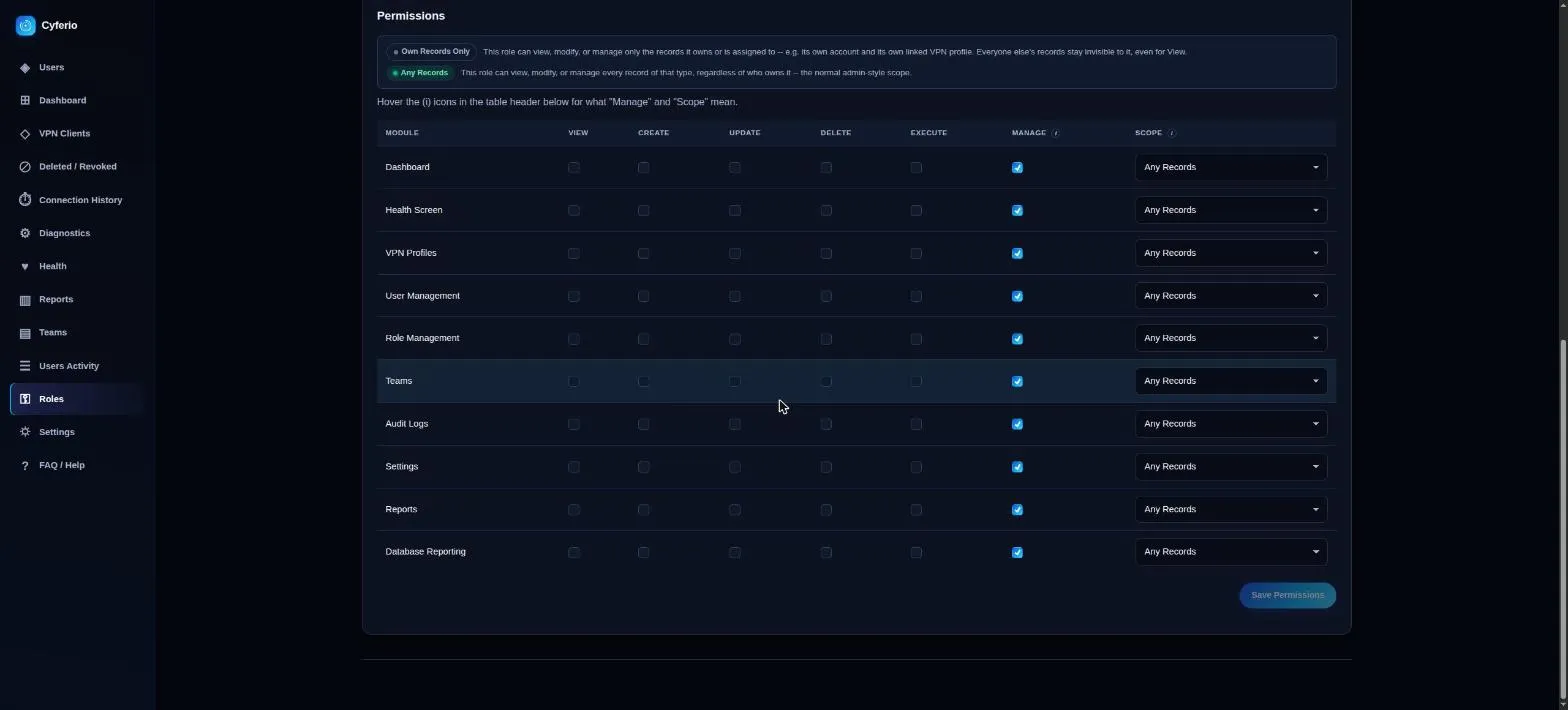
Each module (Dashboard, VPN Profiles, User Management, Role Management, Teams, Audit Logs, Settings, Health Screen, Reports) can be granted View / Create / Update / Delete / Execute / Manage independently, plus a scope of Any record or Own record only – the latter is what makes the self-service “User” role possible. “Manage” is a superset that grants every action on that module, including on records that aren’t the caller’s own.
Built-in roles
Section titled “Built-in roles”| Role | Summary |
|---|---|
| Admin | Full control of every module. |
| Editor | Can add/revoke/edit VPN clients and manage their MAC addresses. No user management, teams, or settings access. |
| Viewer | Read-only: status/list/check, no add/revoke/user-management. |
| User | Access to only their own VPN profile and account – no visibility into other users, teams, audit logs, or settings. |
Custom roles work the same way: create one on the Roles page, name it, then check the boxes for whatever it should see or do per module. A custom role can’t be assigned Any-scope on a module without being granted the matching permission first, and system roles can be renamed/described but never deleted.
VPN profile ↔ portal account identity
Section titled “VPN profile ↔ portal account identity”Every VPN client certificate is linked 1:1 to a portal user account.
Adding a new client (/clients, or the CLI’s --add-user) automatically
links it to a matching existing portal username, or creates a brand-new
“User” (self-service) account for it if none matches – the temp
password is shown once, immediately, in the admin UI response. It is never
stored or shown again after that, so relay it to the device’s owner right
away.
That link then keeps both sides in sync going forward: suspending or soft-deleting the linked portal account revokes the VPN certificate, and revoking the certificate from the Clients page suspends the linked portal account.
Migrating an existing deployment
Section titled “Migrating an existing deployment”Deployments that predate this feature have VPN clients with no linked portal account yet. Align them once, after upgrading:
docker compose exec app python migrate_vpn_profiles.py preview # read-only, changes nothingdocker compose exec app python migrate_vpn_profiles.py run # asks for confirmation, then applies itdocker compose exec app python migrate_vpn_profiles.py last-reportrun never revokes, restores, or purges any VPN certificate – it only
reads the current client list and creates/links portal accounts, every one
of them permanently exempt from auto-revoke. Temp passwords for
newly-created accounts are printed once, to that terminal, at that moment
– last-report intentionally does not (and cannot) show them again
afterward.
The self-service experience
Section titled “The self-service experience”A “User” (self-service) account gets a My VPN Profile page: view their
own profile, manage their own MAC addresses, download their own .ovpn,
and restrict their own VPN connections to a single permitted country –
with no visibility into any other user’s clients, users, teams, audit
logs, or settings. That self-service country pick is a VPN Access
Restriction, applied straight to
the linked profile’s policy – it never affects the same account’s own
portal login, and requires a linked VPN profile to begin with (an account
with none yet gets a clear message instead of the control).
Reassigning or clearing a VPN Profile link
Section titled “Reassigning or clearing a VPN Profile link”An admin can change which VPN profile a user is linked to, or clear the link entirely, from Edit User’s VPN Profile section – a small Change button next to the current profile name reveals the same “pick an unassigned profile” control Add User uses, plus a Clear Assignment option. Either action only ever touches the link between the portal account and the VPN client: the client itself (certificate, MAC allowlist, connection history, VPN Access Restrictions) is completely untouched and simply becomes unassigned again, exactly like a profile that was never linked to anyone – available to attach elsewhere from the same dropdown. Revoking or deleting the underlying VPN client stays a separate, deliberate action on the Clients page.
Guardrails
Section titled “Guardrails”You can’t deactivate, delete, or demote your own account, and you can’t remove the last active admin. The bootstrap admin – the very first admin account a deployment ever creates – has a stricter rule on top of that: it can never be demoted, deactivated, or deleted (soft or permanent) by anyone, including another admin, full stop. Every other admin account remains fully demotable/deactivatable/deletable by another admin, same as any account, subject only to the guardrails above.
Developed by Cloudlative