
Deployment & Configuration
Architecture
Section titled “Architecture”- Backend: FastAPI, server-rendered HTML (Jinja2) + a bit of vanilla JS calling a JSON API – no separate frontend build step.
- Database: SQLAlchemy, works with either SQLite (zero-setup default,
still the right choice for local/dev) or PostgreSQL (production, via the
postgrescompose service). Only stores this app’s own accounts and audit log – VPN client data always comes live from the CLI scripts. - Runs co-located with the OpenVPN server: calls
openvpn-install.sh/vpn-status.pyviasubprocesson the same box, not over SSH. - No shell injection surface: every subprocess call uses an explicit
argument list, never
shell=Trueor string-built commands.
For how much CPU/RAM/storage this actually needs at different scales, see Sizing & Infrastructure.
Bind mounts
Section titled “Bind mounts”docker-compose.yml bind-mounts what the container needs from the host
(paths relative to the repo root, where the compose file lives):
| Mount | Why |
|---|---|
/etc/openvpn:/etc/openvpn (rw) |
--add-user/--revoke-user write new certs and update openvpn_db.txt here |
/var/log/openvpn:/var/log/openvpn (ro) |
vpn-status.py reads connection/rejection history from here |
./openvpn-install.sh, ./vpn-status.py (ro) |
the scripts this app wraps – bind-mounted, not baked into the image, so a git pull on the host takes effect without rebuilding |
./app/data |
SQLite file persistence, only relevant if DATABASE_URL stays on the SQLite default |
First-time setup on a new machine
Section titled “First-time setup on a new machine”One guided entrypoint, setup.sh (repo root), takes a fresh box the rest
of the way to a running portal – idempotent, so re-running it reports what
(if anything) changed rather than redoing work, and safe to run any number
of times against a box it already provisioned. It can’t do the very first
step itself (registering repo access needs an already-authenticated
session, and that’s yours, not a brand-new box’s) – so it’s still two
steps in practice:
-
add-machine.sh(repo root) – run from your own machine, not the target host:Terminal window ./add-machine.sh --host 203.0.113.10 --user ubuntuNeeds the
ghCLI authenticated locally and that you can already SSH to the target host. It generates an ed25519 keypair on the target host (the private half never leaves it), registers the public half as a read-only deploy key on the repo, wires up an SSH config alias, and clones (or fetches) into/opt/cyferio. Idempotent – safe to re-run against a box that already has some of this done. -
setup.sh(repo root) – run on the target host (sshin first). Guided prompts by default – OpenVPN only, or OpenVPN + this web app portal? domain/ACME email if the portal is wanted, then two optional integrations: a MaxMind GeoIP key, and a CAPTCHA provider (Cloudflare Turnstile or Google reCAPTCHA) for the login/password-reset pages – or fully non-interactive via flags:Terminal window sudo /opt/cyferio/setup.sh --mode webapp \--domain portal.example.com \--use-staging-first # first time on a genuinely new domainsetup.shorchestratesopenvpn-install.sh(installs OpenVPN itself, if not already installed) and, for--mode webapp,setup-new-machine.sh(everything else a fresh host needs for the portal: Docker + the Compose plugin, generating the scoped SSH “host executor” key + forced-command wrapper + sudoers grant used by the Clients page’s live session list/disconnect, writing.env, and bringing the stack up – Let’s Encrypt staging cert first if requested, then production). Run with--mode openvpnfor the CLI-only path with no web app at all.
Re-running setup.sh is safe – every phase checks its own current state
first (a marker file at /etc/cyferio/.setup-provisioned, written
on first successful run, is how it tells “a box I already set up, safe to
reconcile” apart from an unrecognized machine it should refuse to touch
instead). Nothing already correct gets redone – keys/sudoers/
authorized_keys entries aren’t duplicated, an existing .env is left
alone unless you pass --force-env, and a clean re-run reports
“nothing to do – configuration already reconciled” rather than silently
no-op’ing. See ./setup.sh --help for the full flag list.
TLS / reverse proxy (Traefik)
Section titled “TLS / reverse proxy (Traefik)”docker-compose.yml includes a traefik service fronting app: it
terminates TLS, issues/renews a Let’s Encrypt certificate automatically via
the HTTP-01 challenge, and redirects plain HTTP to HTTPS. Configure it via
.env:
APP_DOMAIN– the public hostname to request a cert for; must already resolve to this host’s public IP, and ports 80/443 must be reachable from the internet.ACME_EMAIL– a real, monitored mailbox; Let’s Encrypt sends expiry/problem notices here.ACME_CASERVER– leave unset for Let’s Encrypt production. Point at the staging directory first when standing this up or changing domains, to avoid burning production rate-limit attempts on a config that isn’t verified yet.SESSION_HTTPS_ONLY=true– once Traefik is actually terminating TLS, set this so the session cookie is markedSecure.
Database: SQLite (dev) vs PostgreSQL (production)
Section titled “Database: SQLite (dev) vs PostgreSQL (production)”SQLite remains the zero-setup choice for local/dev. Production runs
PostgreSQL: set DATABASE_URL=postgresql://vpnadmin:<password>@postgres:5432/vpnadmin
in .env and a POSTGRES_PASSWORD. Data persists in the named pgdata
volume across container recreation.
Moving an existing SQLite deployment into Postgres:
python3 scripts/migrate_sqlite_to_postgres.py \ --sqlite-url sqlite:////opt/cyferio/app/data/app.db \ --postgres-url postgresql://vpnadmin:<password>@localhost:5432/vpnadminThis reuses the app’s own SQLAlchemy models against both databases (never hand-translated SQL) to copy every row table-by-table, preserving ids/foreign keys/timestamps, and prints a per-table row-count comparison at the end. Keep the original SQLite file around as a safety net even after cutting over.
Runtime settings
Section titled “Runtime settings”Branding, deployment, outbound email, Geo/IP, CAPTCHA, security, and
audit-log-retention are editable at runtime from the Settings page
(/settings, admin-only), stored in the database, and take effect
immediately app-wide – no .env edit or restart needed. Environment
variables remain the seed/fallback default for anything never touched on
this page.
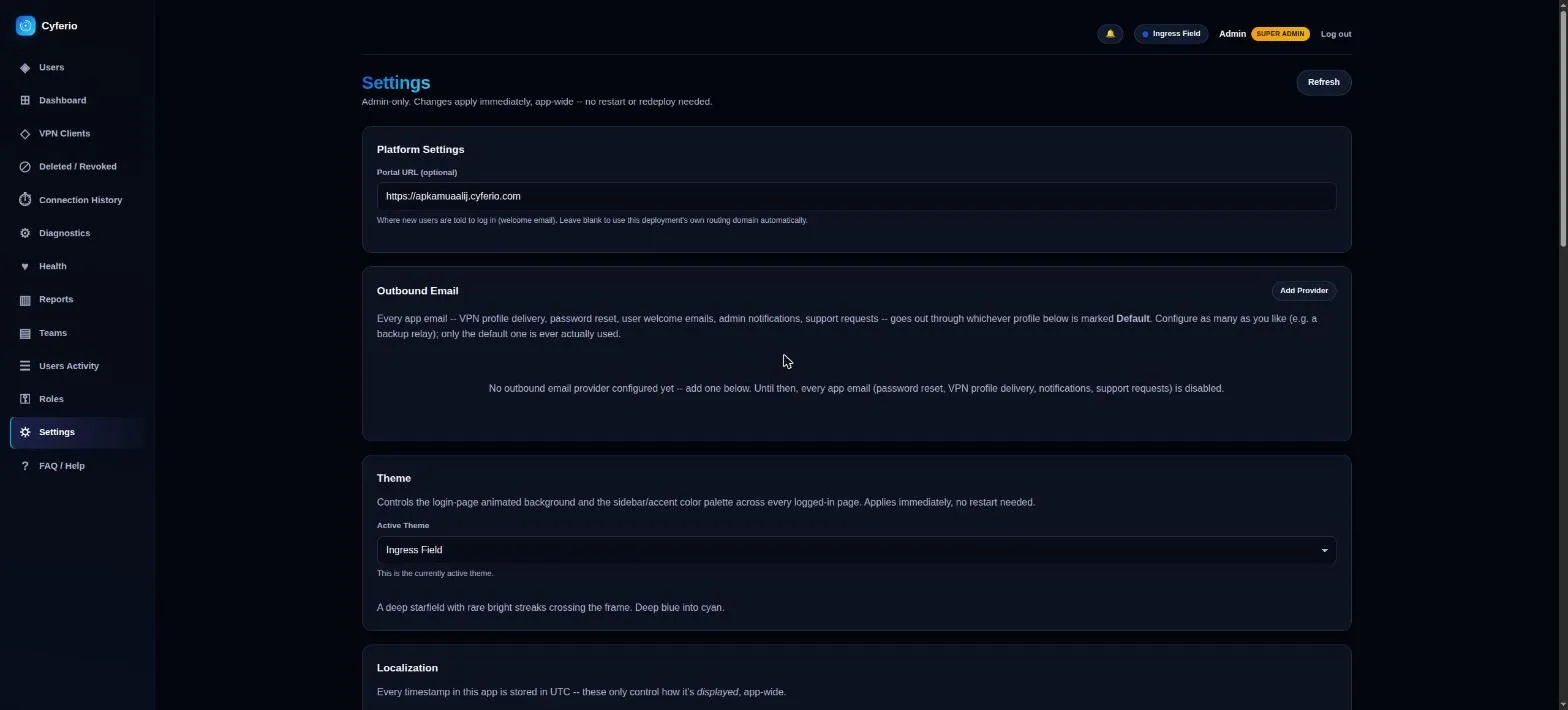
The app’s branding (name, logo, favicon) is fixed and not admin-configurable – the Portal URL (used in the welcome email) and outbound email are.
Outbound email is provider-driven, not SMTP-only
Section titled “Outbound email is provider-driven, not SMTP-only”Multiple named provider profiles (SMTP, Resend, more addable without touching core code) can coexist; exactly one is marked the default, and every app-generated email – password resets, welcome/.ovpn delivery, user invitations, admin notifications, support requests from the FAQ page – goes through whichever profile is currently the default. Setting a new default automatically un-sets the previous one, and the active default can’t be deleted until another profile is chosen to replace it. Each profile has a Test action that sends a real message through it before you rely on it. An upgrade from an older, SMTP-only version migrates existing SMTP settings into a “Primary SMTP” profile automatically, marked default, with no manual reconfiguration.
Geo/IP and CAPTCHA are optional integrations, on or off from Settings
Section titled “Geo/IP and CAPTCHA are optional integrations, on or off from Settings”Both follow the same shape: unconfigured, the feature doesn’t just degrade – it’s fully hidden, front end and back end alike (menu items, report sections, widgets, and the underlying API routes all disappear; a direct API call to a disabled feature’s endpoint gets a plain 404, not a 403 or an empty result, so there’s nothing to distinguish “not configured” from “doesn’t exist”). Configuring it from Settings enables it everywhere at once, no restart needed.
- Geo/IP (MaxMind): an enable toggle plus a license key field power every country/city/ASN restriction and geo report across the app (see Restrictions). Validate Key checks the key against MaxMind without downloading anything; Save & Refresh Databases saves it and immediately triggers a download of all three GeoLite2 editions over the same scoped SSH host-executor connection the Clients page’s live-session actions use – the existing weekly refresh timer (see Restrictions) keeps them current after that. Disabling only flips the flag; the downloaded databases and the key stay on disk, so re-enabling later is instant.
- CAPTCHA: pick a provider (Cloudflare Turnstile or Google
reCAPTCHA v2) and paste its site/secret key pair to gate
/login,/forgot-password, and/reset-passwordagainst scripted submissions; leave it unset and those pages render with no widget at all. Switching providers takes effect immediately, no reinstall. A Test action submits a deliberately-invalid token to the provider’s own verification API to confirm it’s reachable and (for Turnstile specifically) that the secret key itself is valid – Google’s API doesn’t expose enough information to confirm a reCAPTCHA secret this same way, which the result says plainly rather than reporting a false positive.
Both providers’ secret-key fields, plus the Turnstile site key, lock behind an Edit button once a value is saved, rather than sitting in a live-editable box holding the real (masked, for secrets) value – click Edit to intentionally clear and replace it.
Default Group for New Users
Section titled “Default Group for New Users”Settings’ User Management card lets an admin pick which Group the Add User form’s Group field pre-selects, instead of forcing “Select a group…” on every single account created. It’s a UX default only – the form still submits an explicit group, so an admin can always pick a different one before creating the account. Leave it unset and the picker keeps forcing an explicit choice, same as before this setting existed.
Release Availability indicator
Section titled “Release Availability indicator”A sidebar indicator (admin-only) polls GET /api/release/status on a
timer and shows one of Updated, Update available, or Critical
update, based on GitHub’s published releases for this project. Clicking
it opens the release notes and the exact upgrade command to run on the
host. The first time it detects a given release, it also auto-files an
Upgrade Assignment ticket in the Support Center’s System Maintenance
workflow, so the upgrade itself gets tracked and claimed like any other
piece of work. See app/README.md’s “Upgrading an already-deployed host”
section for the actual upgrade.sh command it points at.
Releases
Section titled “Releases”Image builds are tag-triggered, not push-triggered:
git tag v1.0.0git push --tagsThat runs the full pipeline (test → build/push → Trivy scan) and
publishes ghcr.io/cloudlative/cyferio-app:1.0.0 and :latest – note: no
leading v on the published image tag, even though the git tag itself is
vX.Y.Z. A plain git push to master only runs the test job – no image
is built or published.
To deploy an exact version instead of always tracking latest, set
IMAGE_TAG=X.Y.Z in .env. Rolling back a bad deploy: set IMAGE_TAG to
a known-good previous version and re-run
docker compose pull && docker compose up -d.
The container runs as root (needed to touch root-owned /etc/openvpn and
run easyrsa) with USE_SUDO=false – no sudo binary needed since the
process already has the privilege it would otherwise escalate to.
Developed by Cloudlative