
Portal Login Restrictions
Independent from VPN Access Restrictions, an admin login to the web app itself can also be restricted per user – to a set of countries, cities, networks (ASNs), IPs/CIDR ranges, any combination, or (the default) neither. Setting a Portal Login Restriction never affects that same user’s VPN connections, and vice versa – the two field sets have their own independent storage, described in more detail on the VPN Access Restrictions page.
Where: Users page → Add User’s “Portal Login Restrictions” section, or an existing user’s Edit dialog → “Portal Login Restrictions”. Four independent toggles – restrict by country, city, network (ASN), or IP address – each with its own list, editable regardless of which others are on.
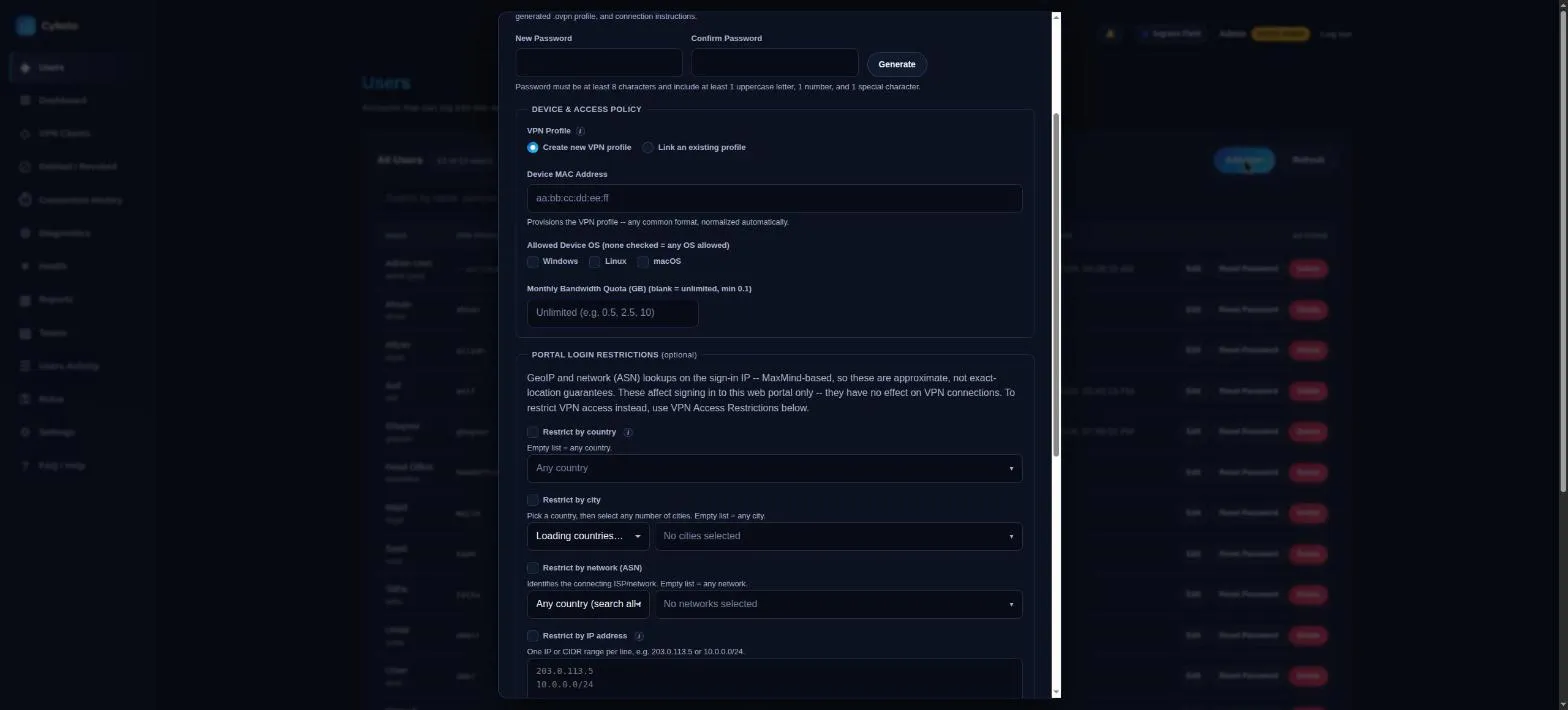
How each restriction type works
Section titled “How each restriction type works”- Countries are picked from the full ISO 3166-1 country list used elsewhere in the app (no API call at runtime).
- Cities and networks (ASN) are picker-only, not free text. Both use a cascading “pick a country, then pick from its real values” control, sourced directly from the GeoLite2-City/GeoLite2-ASN databases GeoIP queries at login time – a hand-typed value GeoIP could never actually return would create a restriction that can never be satisfied (a silent, permanent lockout), so only values that genuinely exist in the database are selectable. City picks accumulate across countries. ASN’s country picker also offers an “any country” mode that searches every known network by name, since an ASN isn’t inherently tied to one country (global operators like Google or Cloudflare route from everywhere).
- IPs are one per line, each either a single address (
203.0.113.5) or a CIDR range (10.0.0.0/24), IPv4 or IPv6.
Order of checks
Section titled “Order of checks”Country, then city, then ASN, then IP (broadest signal to narrowest) – all before the password is ever verified, so a request blocked on any dimension never touches password-hashing, and never reveals whether the username/password would otherwise have been correct.
A blocked attempt gets a specific message per dimension (“Login is not permitted from your current country/city/network/IP address”); a genuinely wrong username or password still gets the same generic “Invalid username or password” as before, so a blocked-vs-wrong-credentials response never leaks which case it was.
Audit trail: every blocked attempt is logged (Users Activity page,
action login_blocked_country/login_blocked_city/login_blocked_asn/
login_blocked_ip) with the attempted username, source IP, detected
country/city/ASN, and which restriction blocked it.
GeoIP setup
Section titled “GeoIP setup”Country/city/ASN checks reuse the same GeoLite2 editions as VPN Access Restrictions – no separate MaxMind account needed. The one difference: these lookups happen inside the app’s own Docker container, not on the bare host, so they need:
- The
geoip2Python package – already inapp/requirements.txt, nothing to install manually. GEOIP_DB_PATH/GEOIP_CITY_DB_PATH/GEOIP_ASN_DB_PATHeach pointed at their.mmdbfile – defaults to the paths the host-side GeoIP setup already produces under/etc/openvpn/server/, which the app already bind-mounts read-write.
Each database is independent of the others; the IP check needs no database at all.
Developed by Cloudlative