
Device & Access Restrictions
MAC-address binding
Section titled “MAC-address binding”Every client connection is checked against a registered name=mac
allowlist (openvpn_db.txt) in addition to normal certificate
authentication, via a client-connect script. --add-user registers each
client this way; a client-connect script
(openvpn-mac-addr-check.py, already wired into server.conf) checks the
connecting certificate’s CN against the device’s MAC address (via
IV_HWADDR, which requires push-peer-info – already set in every
generated .ovpn) on every connection attempt, and rejects anything that
doesn’t match.
This adds a device-binding layer on top of normal certificate
authentication: a stolen or copied .ovpn file alone isn’t enough to
connect from an unregistered device.
Per-client restrictions
Section titled “Per-client restrictions”On top of MAC binding, each client can optionally be restricted by:
| Restriction | How it’s checked |
|---|---|
| Allowed countries | One or more ISO 3166-1 countries (or unrestricted); verified via GeoIP against the connecting IP. |
| Allowed cities | One or more city names, verified via GeoIP (GeoLite2-City). |
| Allowed networks (ASN) | One or more autonomous system numbers, verified via GeoIP (GeoLite2-ASN) – identifies the connecting ISP/network rather than a physical location. |
| Allowed IP addresses | One or more single IPs or CIDR ranges, checked directly against the connecting IP – no GeoIP database needed. |
| Allowed device OS | A subset of windows / linux / mac, matched against OpenVPN’s own IV_PLAT. Leaving this empty means unrestricted – it does not mean “block everything.” |
| Monthly bandwidth quota | A soft cutoff in GB, checked only at connection time. A session that goes over quota mid-connection is not killed – it just can’t reconnect once the quota is used up. Resets on the 1st of each calendar month, server-local time. |
Every restriction is entirely optional per client, and all are orthogonal to the MAC-binding check (which always applies regardless). Country / city / ASN / IP here are VPN Access Restrictions – deliberately independent from a linked portal user’s own Portal Login Restrictions, which gate signing in to the web app and use the same four restriction types but their own separate storage. Setting one has no effect on the other: an admin can restrict a user’s VPN connections to one country while leaving their portal login unrestricted (or vice versa), and a user’s own self-service VPN country pick (see the self-service experience) never touches their portal login either.
Setting restrictions from the web admin
Section titled “Setting restrictions from the web admin”Two equivalent entry points, both editing the exact same
client_policy.json entry:
- The VPN Clients page’s Manage Restrictions dialog, per client.
- The Users page’s Add User / Edit User dialogs have their own VPN Access Restrictions fieldset – set a new user’s VPN restrictions at creation time, or an existing user’s linked profile without leaving the Users page. Right above it, a separate Portal Login Restrictions fieldset covers the portal-login side.
Either grouped into “Device & Access Policy” (OS, bandwidth) and “VPN Access Restrictions” (country, city, ASN, IP) – plus a best-effort “used this month” indicator when a quota is set.
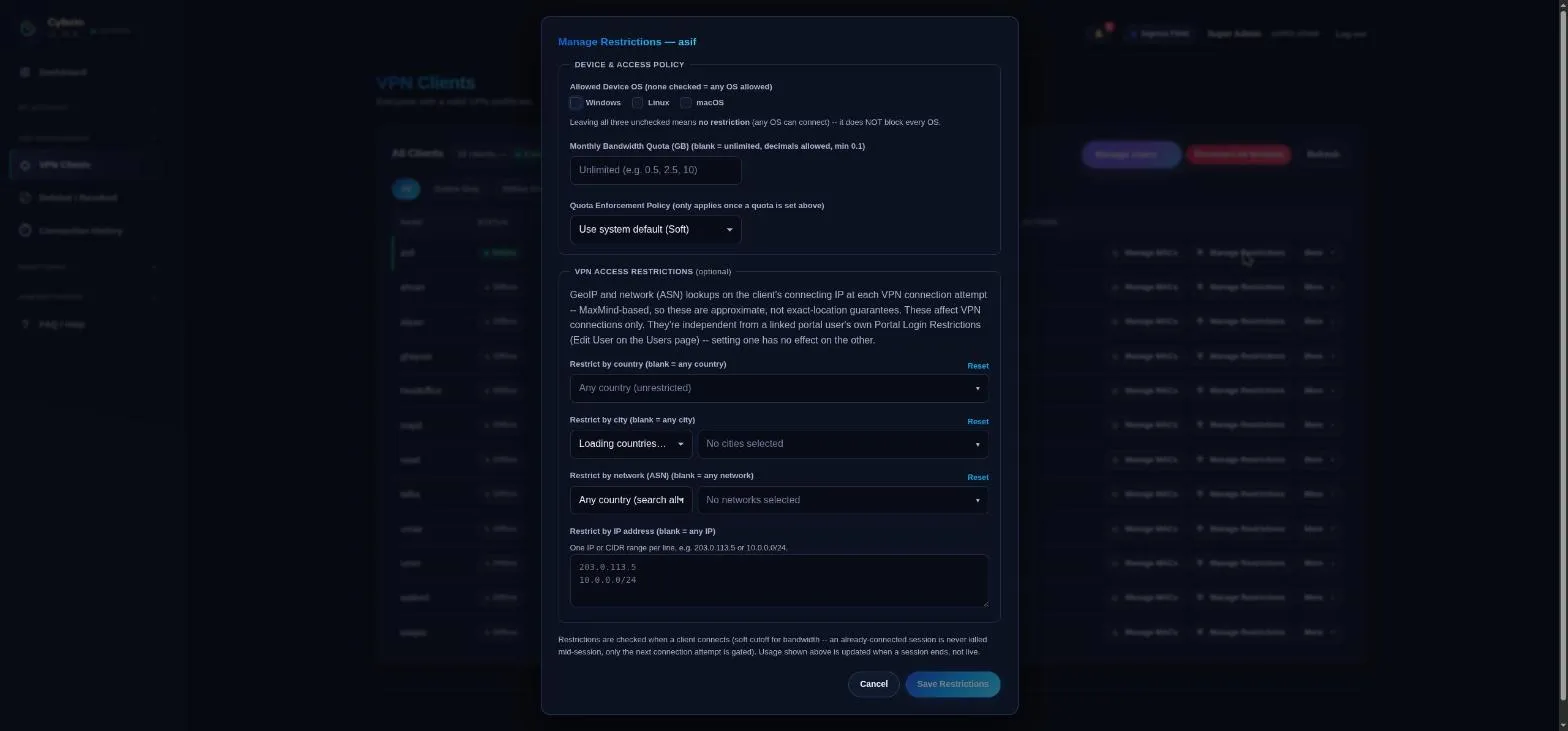
The country list is a static, self-contained dataset (no external API call at runtime); city and ASN use cascading “pick a country, search its real GeoIP values” pickers, so you can only select a value that actually exists in the database.
How enforcement works
Section titled “How enforcement works”Enforcement happens on the OpenVPN host itself, in scripts under
host-scripts/ (installed to /etc/openvpn/server/):
File (deployed to /etc/openvpn/server/) |
server.conf directive |
|---|---|
openvpn-mac-addr-check.py |
client-connect /etc/openvpn/server/openvpn-mac-addr-check.py |
openvpn-client-disconnect.py |
client-disconnect /etc/openvpn/server/openvpn-client-disconnect.py |
policy_lib.py |
imported by both scripts above – no server.conf entry needed |
Automated (recommended): the Python installer handles all of this
itself. A fresh install (app/cli/openvpn_admin.py install, or
setup.sh/openvpn-install.sh at the repo root, which both call into it)
deploys and wires everything above automatically, before OpenVPN’s first
start. An already-installed server
can be brought up to date with:
sudo python3 app/cli/openvpn_admin.py install-host-scripts # stage files + server.conf change onlysudo python3 app/cli/openvpn_admin.py install-host-scripts --restart # ...and restart the service nowBoth forms are idempotent. Without --restart, the server.conf change is
staged but not yet active – restart at a chosen maintenance window, since
it drops every currently-connected client.
The connect script checks, in order, once identity is established by the
MAC check: OS → country → city → ASN → IP address
→ bandwidth quota. Each rejection is logged with a machine-readable
reason (mac_mismatch, os_not_allowed, country_not_allowed,
country_lookup_failed, and so on), visible via
vpn-status.py --rejected-connections and the web admin’s Diagnostics page.
Storage
Section titled “Storage”Two JSON files under /etc/openvpn/server/policy/ (paths configurable via
vpn-tools.conf’s CLIENT_POLICY_FILE/CLIENT_USAGE_FILE):
-
client_policy.json– admin-configured restrictions, keyed by client name:{"alice": {"allowed_countries": ["PK", "AE"], "allowed_cities": ["Karachi"], "allowed_os": ["windows", "linux"], "bandwidth_monthly_gb": 5},"bob": {"allowed_asns": ["AS15169"], "allowed_ips": ["203.0.113.5", "10.0.0.0/24"], "bandwidth_monthly_gb": 10}}A client absent from this file, or present with an empty object, is fully unrestricted (only the MAC check applies).
-
client_usage.json– monthly bandwidth usage, keyed by client name, written only byopenvpn-client-disconnect.py:{"alice": {"period_start": "2026-08-01", "bytes_used": 1073741824}}
Both files use an atomic write-to-tmp-then-rename pattern with
flock-based locking, so the app, the CLI, and the connect/disconnect
scripts can all touch them concurrently without corruption.
Setting up GeoIP (country / city / ASN)
Section titled “Setting up GeoIP (country / city / ASN)”Country, city, and ASN restrictions need the matching MaxMind GeoLite2 database on the OpenVPN host, which requires a free MaxMind account. Until it’s configured, GeoIP doesn’t just fail soft – every trace of it (menu items, restriction fields, report sections, the underlying API routes) is hidden from the app entirely, admin and self-service portal alike.
Running the web app portal: sign up at
maxmind.com/en/geolite2/signup,
generate a license key, then paste it into the Geo/IP (MaxMind) card on
the Settings page (/settings, admin-only) and toggle it on. Save &
Refresh Databases saves the key and immediately downloads all three
GeoLite2 editions over the app’s existing SSH host-executor connection –
no shell access to the OpenVPN host needed. Validate Key checks it
against MaxMind first, without downloading anything, if you just want to
confirm it’s good. See Deployment & Configuration
for the full behavior.
CLI-only deployment (no web app), or setting it up by hand:
-
Sign up at maxmind.com/en/geolite2/signup and generate a license key.
-
Add it to
/etc/openvpn/vpn-tools.conf:MAXMIND_LICENSE_KEY=your_key_here -
Run
sudo bash geoip-update.shonce to fetch the database(s) – defaults to/etc/openvpn/server/GeoLite2-Country.mmdb/-City.mmdb/-ASN.mmdb. -
Install the weekly refresh timer (already running if the Settings page was used instead –
setup.sh/setup-new-machine.shinstalls this unconditionally, key or no key yet):Terminal window cp systemd/openvpn-geoip-update.{service,timer} /etc/systemd/system/systemctl enable --now openvpn-geoip-update.timerSafe to install before steps 1-2 – the update script detects a missing license key and exits cleanly instead of erroring.
-
Install the pure-Python GeoIP reader on the OpenVPN host:
Terminal window python3 -m pip install geoip2 -
Pick countries/cities/ASNs/IPs per client from the Manage Restrictions dialog on the VPN Clients page – no deployment-wide setting to configure, every client is independent.
IP address restriction needs none of this – it’s a pure ipaddress
stdlib comparison against the connecting IP, no MaxMind database involved.
Developed by Cloudlative